Intelligent systems for modern manufacturing

From inline machine vision to plant-wide IoT dashboards, every solution is engineered around your process, your part and your throughput target, then installed and supported by the same team.

Illustration of a production line fitted with Trisun systems. Select a station to see how it works.

AI-based machine vision inspection

Cameras and AI check every part inline at full production speed, with no sampling gaps, and give your line a clear OK or NG it can act on.

Machine VisionOCRMeasurementTraceability

What it checks

  • Presence and absence of components
  • Text and codes (OCR) on varied fonts, colours and surfaces
  • Placement, order and orientation
  • Dimensions, hole count and hole position with sub-millimetre accuracy
  • Colour and object classification
  • Object tracking with a live dashboard

What you gain

Every partchecked inline, with no sampling gaps
Fewer escapesdefects caught before they reach the next station
Less reworkproblems flagged at the source, not at final QA
Full recordresults stored for every part for audits

How it works on your line

  1. 1Capture

    Industrial camera and lighting image every part as it moves.

  2. 2Analyse

    The AI model checks presence, position, text or size in real time.

  3. 3Decide

    OK or NG against your tolerances, with the reason shown.

  4. 4Act

    Signals the PLC to reject, mark or stop, or sends data to marking machines and printers.

  5. 5Record

    Counts and results logged on a dashboard for QA audits.
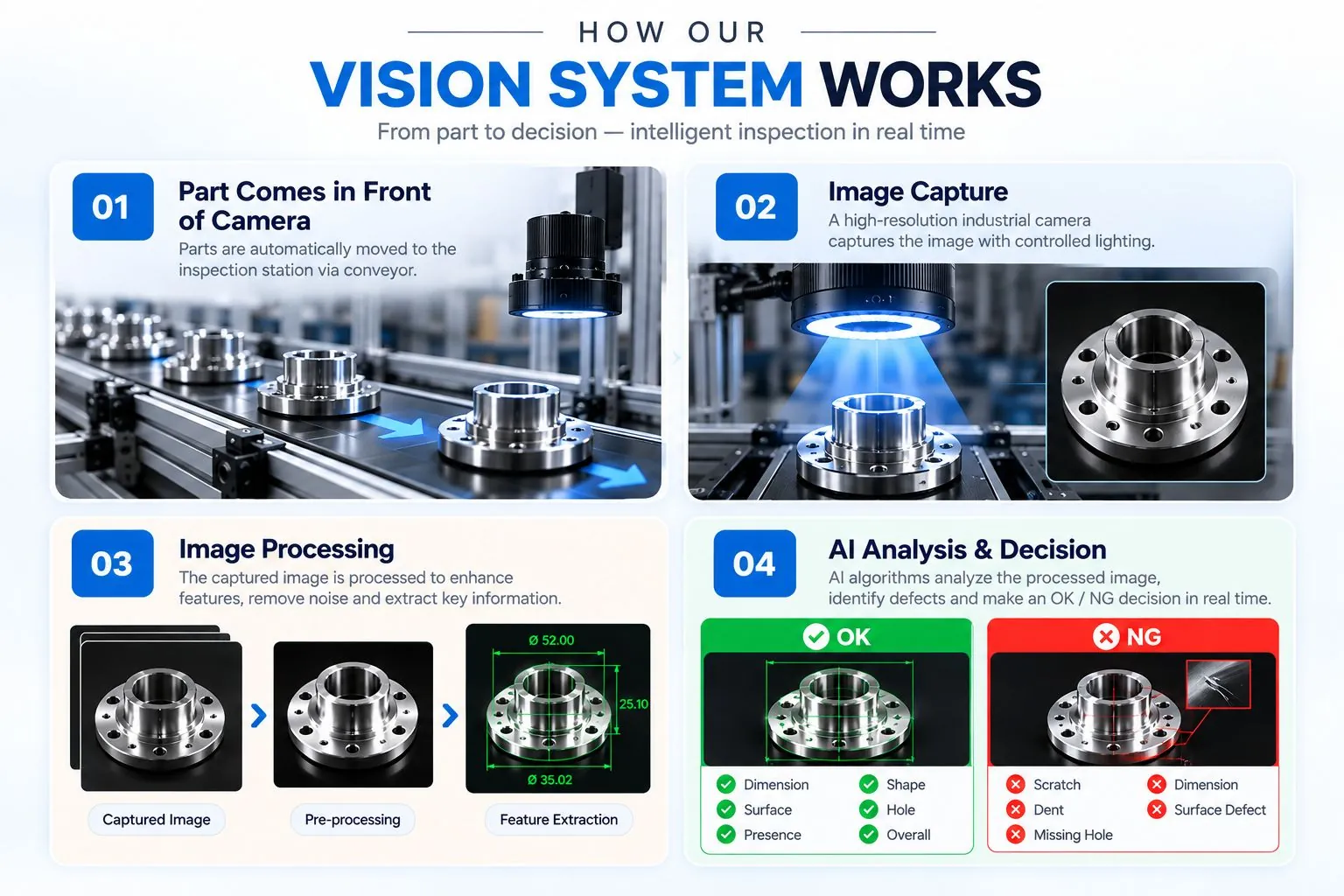
How our vision system works, from part to decision
The inspection process in pictures: part arrives, image capture, image processing, then the AI's OK or NG decision. Select to enlarge.

Typical applications

Component presence on assembliesPart and serial number readingDimensional measurementAssembly verificationLabel and print checks
Discuss a vision project

Special purpose machines and robotics

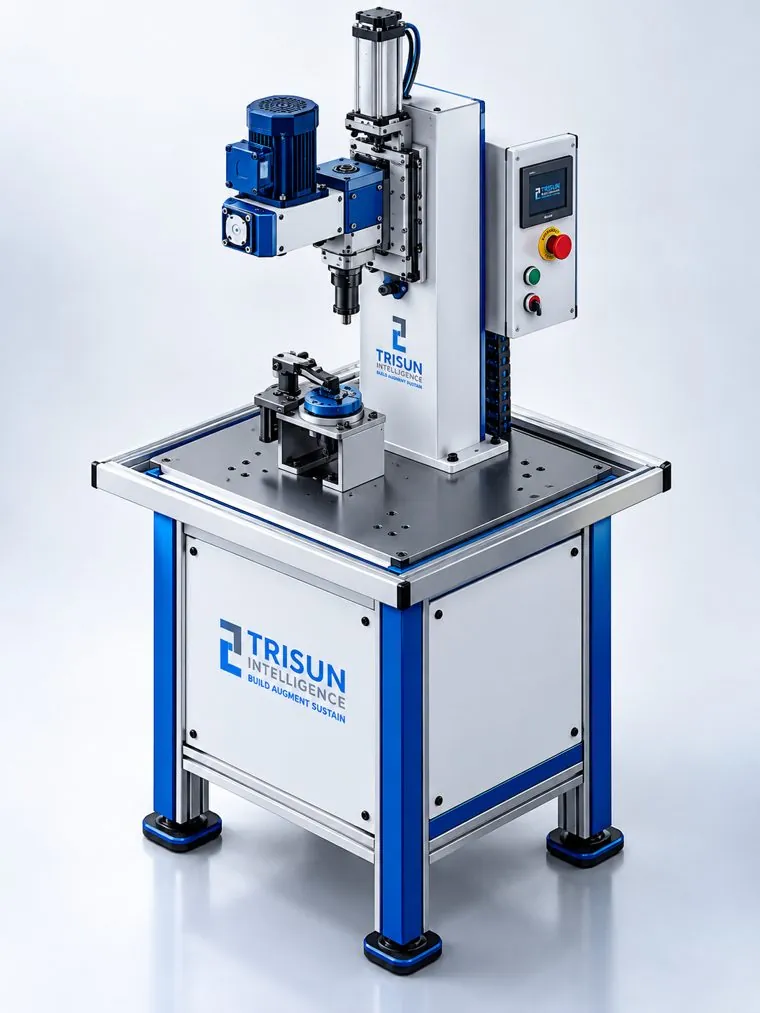
Machines and robotic cells designed, fabricated and programmed in-house around your part, your cycle time and your floor space.

RoboticsSPMPick & PlaceControl Systems
Trisun special purpose machine with pneumatic press, fixture and control panel

What we build

  • Robotic clip and component assembly cells
  • Pick and place, loading and unloading automation
  • Cutting, pressing and trimming SPMs with quick die change
  • Cylindrical robots, conveyors and control units
  • Safety interlocks, light curtains and sensors on every machine
  • Integration with your existing PLC and SCADA systems

What you gain

More outputconsistent cycle times, shift after shift
Less manual workoperators move from repetitive tasks to supervision
Steady qualitythe same force, position and timing every cycle
Safer stationsguards, interlocks and light curtains built in

A typical automation cycle

  1. 1Load

    The part is placed in a fixture, by hand or by conveyor.

  2. 2Feed

    Components such as clips or fasteners arrive automatically.

  3. 3Process

    The robot or press picks, places, presses or cuts.

  4. 4Check

    Sensors confirm the operation before release.

  5. 5Unload

    The finished part moves on and the next cycle starts.

Typical applications

Component and clip assemblyPick and placeMachine loading and unloadingCutting and trimmingPressingConveyors and handling
Discuss a machine

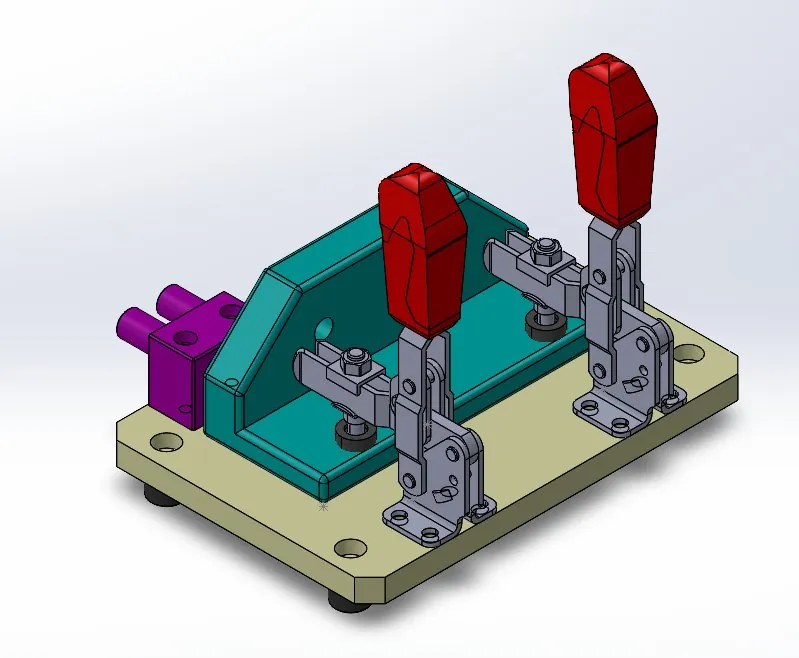
Jig, fixture, tool and die design

Jigs, fixtures, tools and dies designed in 3D CAD around your part and process, then built and tried out so every part locates, clamps and forms the same way, every time.

Jigs & FixturesTool DesignDie Design3D CAD
3D CAD design of a fixture with toggle clamps

What we design

  • Welding, assembly and machining fixtures
  • Checking fixtures and gauges for inspection
  • Drilling and assembly jigs
  • Press tools and dies for cutting, piercing, blanking and trimming
  • Quick-change tooling for lines that run several products
  • Fixtures for our special purpose machines and vision stations

What you gain

Repeatablethe part sits in exactly the same place every cycle
Faster loadingquick, error-proof clamping for operators
Better qualityaccurate location means accurate welds, holes and cuts
Built to fitdesigned for your machines, presses and floor

How a tooling project runs

  1. 1Study

    Part drawings, CAD models and the process are reviewed.

  2. 2Design

    3D model with the locating and clamping scheme.

  3. 3Review

    The design is checked with you before anything is built.

  4. 4Build

    Machining, fabrication and assembly.

  5. 5Try-out

    Tested with real parts and fine-tuned before handover.

Typical applications

Welding fixturesAssembly fixturesChecking fixturesDrill jigsCutting and trimming diesSPM and vision fixtures
Discuss a fixture or die

Industrial IoT and plant digitalisation

Sensors, gateways and custom dashboards that make every machine, utility and room on the floor visible and controllable from anywhere.

IIoTDashboardsRemote MonitoringEnergy

What it monitors

  • Gas levels such as ammonia, with an emergency-stop control
  • Voltage and power consumption per unit
  • Temperature, humidity, CO₂ and illumination
  • Machine faults detected from sensor data
  • Custom thresholds with alerts
  • Historical trends for audits and analytics

What you get

Livevalues and history on one custom dashboard
1-clickcontrol, including emergency stop
Low powerportable hardware that scales across plants
Smarterenergy, maintenance and safety decisions

How it works

  1. 1Sense

    Low-power sensors fitted to machines, utilities and rooms.

  2. 2Connect

    An embedded gateway collects readings and sends them on.

  3. 3Visualise

    A dashboard built for your plant shows live values and trends.

  4. 4Alert

    Thresholds trigger alerts; one click stops the equipment.

  5. 5Improve

    History guides energy, maintenance and safety work.

Typical applications

Gas and air-quality monitoringElectrical diagnosticsEnergy usage analysisCold storageUtilities and compressorsClean rooms and labs
Discuss a monitoring project

Traceability and smart inventory

Marking, reading and tracking that give every part and stock item an identity you can follow from production to dispatch.

Part MarkingCode ReadingInventoryQA

What it covers

  • Part marking with dots, codes or labels
  • Vision and OCR reading of codes and serial numbers
  • Line, batch and shift tracking for every part
  • Real-time inventory tracking with automatic updates
  • LED pick-to-light guidance inside stores
  • Dashboards and reports for planning and audits

What you gain

No mix-upsevery part carries its line, batch and time
Faster QAidentity checked automatically, not by hand
Accurate stockinventory updated as items move
Audit-readyhistory for any part in seconds

How traceability works

  1. 1Mark

    Each part gets an identity: a dot pattern, code or label.

  2. 2Read

    Cameras or scanners read it on the line.

  3. 3Verify

    Only correctly identified parts pass QA.

  4. 4Record

    Line, batch and time saved to the database.

  5. 5Trace

    Find the history of any part when you need it.

Typical applications

Part and batch identificationLine-of-origin markingStore and warehouse trackingWarranty and recall traceability
Discuss traceability

Custom software development

Applications built around the way your plant works, from shop-floor screens and production tracking to dashboards and reports, connected to your machines and data.

Custom SoftwareDashboardsIntegrationReports

What we build

  • Production tracking with OK/NG and downtime logging
  • Operator screens and HMI-style interfaces
  • Dashboards with shift and daily reports
  • Software for our vision, traceability and IoT systems
  • Integration with PLCs, databases and existing business software
  • Web and desktop applications for plant teams

What you gain

Fits your processscreens and steps that match how your team works
One source of datamachines, quality and stock in one place
Less paperworkrecords captured automatically, not on paper
Grows with younew features added as your needs change

How a software project runs

  1. 1Understand

    Workflows, users and data sources mapped on site.

  2. 2Design

    Screens and data structure agreed with you.

  3. 3Build

    Developed and connected to your machines and databases.

  4. 4Test

    Tried on site with real data and real users.

  5. 5Support

    Updates, changes and support after go-live.

Typical applications

Production monitoringQuality recordsTraceability databasesMaintenance logsInventory appsManagement reports
Discuss a software project

Embedded solutions

Custom electronics and firmware that connect sensors, actuators and controllers into one working system. It is the layer inside our vision and IoT deployments.

EmbeddedPCB DesignFirmwareSensors
SensorsSwitchesCameras
Trisun controllerCustom PCB + firmware
PLCHMIDashboard

What we design

  • Custom PCBs and firmware
  • Sensor and actuator integration
  • Communication with PLCs, HMIs and cloud dashboards
  • Indicator lights, relays and LED guidance
  • Low-power hardware for use on the shop floor

What you get

Made to fithardware sized to your signals and space
One systemsensors, logic and screens that work together
Testedon the bench and on the line before dispatch
Supportedfirmware updates after commissioning

How a design comes together

  1. 1Specify

    Signals, environment and interfaces agreed at the site survey.

  2. 2Design

    Schematic, PCB layout and enclosure.

  3. 3Program

    Firmware for sensing, control and communication.

  4. 4Test

    Bench and on-line testing before dispatch.

  5. 5Support

    Service and updates after commissioning.

Typical applications

Sensor nodesMachine controllersIndicator and guidance systemsData gateways
Discuss an embedded design

Works with the equipment you already run

Most projects are added to existing lines. We connect to your controls and data rather than asking you to replace them.

  • PLCs
  • SCADA
  • HMIs
  • Marking machines
  • Printers
  • Conveyors
  • Cloud dashboards

Common questions

Can you add inspection or monitoring to a line we already have?

Yes. Most of our vision and IoT systems are added to existing lines and machines. We integrate with your PLCs and stations rather than replacing them.

Do you handle the mechanical and electrical work as well as the software?

Yes. Software, electronics and mechanical engineering are all in-house, from jigs, fixtures, dies and control panels to software, PLC programming and on-site commissioning.

What do you need from us to get started?

A site visit to study the process, and for inspection projects, sample parts so we can design and test against your real conditions.

What happens after the system is installed?

Every system is tested before dispatch and commissioned on site. We train your operators and provide remote and on-site support afterwards.

Not sure which solution fits your line?

Tell us about the problem: a defect you keep missing, a slow manual step, or a machine you can't see. We'll suggest the right approach.